



Choose your solution
Rent XOXO WiFi router with unlimited internet to Mexico
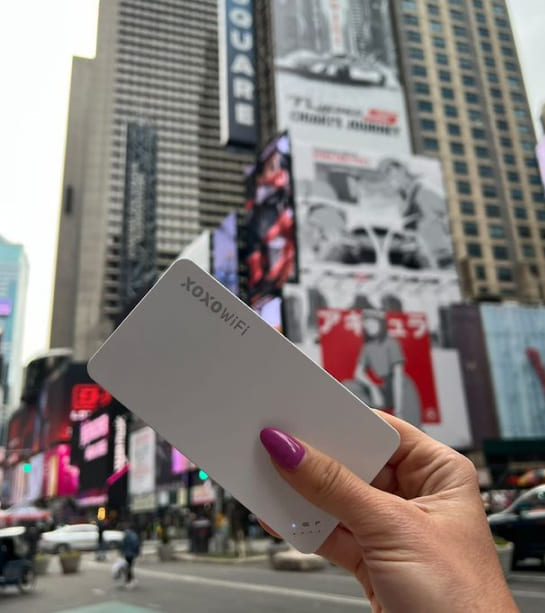
XOXO WiFi is the perfect solution for travelers to Mexico. Our router is equipped with modern technology, which translates into secure, fast and stable Internet access in Mexico. Now you can be online wherever you are.
Rent in 4 steps
1

Fill out the short form on the "Order" subpage.
Select one country or several countries where you can use the Internet and its available terminal. Select only those days that use the Internet, without the duration of the shipment. Universal data package and full delivery and return details.
2

Pick up a router before the travel
The courier will deliver the router a 2-3 days before your trip. You can also pick it up at one of our pick-up points in Warsaw, Krakow, or Lodz, even within 30 minutes after placing your order.
3

Enjoy unlimited access to the internet during your trip
XOXO WiFi will automatically activate in the destination country and on the day marked in the form.
4

After returning, send the XOXO WiFi back to our headquarters or buy it on your own
Pack the router into the enclosed prepaid return envelope and send it to our company's headquarters address. If you want to have the router on hand for your next trip, consider purchasing XOXO WiFi.
Why XOXO WiFi?

Security and privacy
With XOXO WiFi you can log in to the Bank abroad and transfer important files. Data security is our priority. Each device uses modern security systems, so you can be sure that your data is protected.

Fast and stable connection
The router connects you to the best operator in your location. When you move, it automatically switches you to a faster network. XOXO WiFi means comfort and certainty that you will never stay without Internet access. Even after using your daily data package, the service provides you with continuous access to the network.

No hidden costs
With XOXO WiFi, you decide how much you will spend on the Internet, adjusting the daily data package to your needs. You will use more GB than you bought? It's standard. Your bill for the service will be pre-determined before your trip anyway and will not change.

Up to 95% savings on roaming charges
No more high roaming bills after travel. An hour of internet connection outside home country may cost you more than a whole week with XOXO WiFi. Thanks to cooperation with over 350 operators around the world, we guarantee the lowest rates and the best coverage

Turn on navigation on your smartphone while traveling. Find a hotel, restaurant, and the best nearby attractions.
Google Maps, Apple Maps, Waze

Stay in touch
with friends and family.
Maile, Skype, WhatsApp, Viber, WiFi Calling
Why you'll love the XOXO WiFi router?

Share your experiences on social media. Upload photos, videos, and stream live.
Facebook, Instagram, TikTok, Twitter

"Surf" the internet whenever you feel like it. Check the weather forecast, restaurant reviews, or flight change information in real time.
Brak ograniczeń.

They trusted us:





Mexico is one of the most exciting travel destinations in the world. From the white-sand beaches of Cancún and the Riviera Maya to the vibrant streets of Mexico City, ancient Mayan ruins, and colorful colonial towns, Mexico offers unforgettable experiences for every type of traveler.
To make the most of your journey, it is important to have reliable internet access wherever you go. One of the most convenient solutions is renting a XOXO WiFi portable router for Mexico, allowing you to stay connected without relying on expensive roaming charges or unsecured public WiFi networks.
What is a portable WiFi router and how does it work in Mexico?
A portable WiFi router is a compact device that creates a private wireless internet connection wherever you travel. Instead of purchasing local SIM cards or configuring multiple devices, you simply connect your smartphone, tablet, laptop, or other devices to your personal WiFi hotspot.
The XOXO WiFi router connects to local mobile networks in Mexico and provides stable internet access throughout your trip.
How does the XOXO WiFi rental work?
Getting connected is simple and hassle-free:
- Reserve your WiFi router before departure.
- Receive the device at your chosen delivery location.
- Turn on the router upon arrival in Mexico.
- Connect your devices to the WiFi network.
The setup takes only a few minutes and requires no technical knowledge.
As soon as you arrive in Mexico, you can enjoy internet access without searching for local SIM cards or public WiFi hotspots.
What can you do with a portable WiFi router in Mexico?
With a XOXO WiFi router, you can:
- use maps and GPS navigation,
- book hotels and excursions,
- order taxis and transportation services,
- check flight and bus schedules,
- share photos and videos instantly,
- work remotely from anywhere,
- stay connected with family and friends,
- connect multiple devices simultaneously.
Benefits of renting a XOXO WiFi router in Mexico
Traveling with a portable WiFi router provides convenience, flexibility, and peace of mind.
Why choose XOXO WiFi?
✔ reliable internet coverage across Mexico
✔ connect multiple devices at the same time
✔ no expensive international roaming fees
✔ secure private internet connection
✔ easy setup with no technical knowledge required
✔ ideal for families, groups, and business travelers
✔ avoid searching for local SIM cards upon arrival
Whether you're exploring major cities, relaxing on the Caribbean coast, or traveling through remote regions, having constant internet access makes every part of your journey easier.
Who is a portable WiFi router ideal for?
A portable router is perfect for:
- families traveling together,
- groups of friends,
- digital nomads and remote workers,
- business travelers,
- tourists carrying multiple devices.
Instead of purchasing separate data plans for every device, everyone can connect through one convenient WiFi hotspot.
How to choose the right WiFi rental package for Mexico?
The best package depends on your travel style and internet usage.
For basic usage
If you mainly use:
- maps,
- messaging apps,
- email,
- social media,
a standard package is usually sufficient.
For heavier internet usage
Consider a larger data allowance if you plan to:
- work remotely,
- attend video meetings,
- stream movies and videos,
- upload large amounts of photos and content,
- share internet with several devices.
What should you consider?
Before choosing a package, check:
- available data allowance,
- rental duration,
- coverage throughout Mexico,
- number of devices supported,
- pricing that matches your travel budget.
Does the WiFi router work immediately after arriving in Mexico?
Yes.
Simply turn on your XOXO WiFi router after arriving and wait for it to connect to a local network. Within minutes, you will have internet access available for all your connected devices.
This allows you to immediately:
- navigate to your hotel,
- book airport transportation,
- find nearby restaurants and attractions,
- communicate with friends and family,
- access the internet from the moment your trip begins.
XOXO WiFi Mexico – convenient internet for your entire journey
Renting a XOXO WiFi portable router is one of the easiest ways to stay connected while traveling in Mexico. It provides reliable internet access, secure connectivity, and the flexibility to connect multiple devices without worrying about roaming charges or local SIM cards.
Whether you're discovering Mexico City, exploring Chichén Itzá, relaxing in Cancún, visiting Tulum, or road-tripping across the country, XOXO WiFi helps you stay connected throughout your entire adventure.





