



Choose your solution
Rent XOXO WiFi router with unlimited internet to Fuerteventura
Travel to Fuerteventura without worrying about expensive roaming charges! Rent a XOXO WiFi router and enjoy fast, reliable internet wherever your adventure takes you. Connect multiple devices, stay online at the beach, in the mountains, or around the island, and share every moment with family and friends. Easy booking, unlimited convenience, and no hidden fees – the perfect travel companion for your trip to Fuerteventura!
Rent in 4 steps
1

Fill out the short form on the "Order" subpage.
Select one country or several countries where you can use the Internet and its available terminal. Select only those days that use the Internet, without the duration of the shipment. Universal data package and full delivery and return details.
2

Pick up a router before the travel
The courier will deliver the router a 2-3 days before your trip. You can also pick it up at one of our pick-up points in Warsaw, Krakow, or Lodz, even within 30 minutes after placing your order.
3

Enjoy unlimited access to the internet during your trip
XOXO WiFi will automatically activate in the destination country and on the day marked in the form.
4

After returning, send the XOXO WiFi back to our headquarters or buy it on your own
Pack the router into the enclosed prepaid return envelope and send it to our company's headquarters address. If you want to have the router on hand for your next trip, consider purchasing XOXO WiFi.
Why XOXO WiFi?

Security and privacy
With XOXO WiFi you can log in to the Bank abroad and transfer important files. Data security is our priority. Each device uses modern security systems, so you can be sure that your data is protected.

Fast and stable connection
The router connects you to the best operator in your location. When you move, it automatically switches you to a faster network. XOXO WiFi means comfort and certainty that you will never stay without Internet access. Even after using your daily data package, the service provides you with continuous access to the network.

No hidden costs
With XOXO WiFi, you decide how much you will spend on the Internet, adjusting the daily data package to your needs. You will use more GB than you bought? It's standard. Your bill for the service will be pre-determined before your trip anyway and will not change.

Up to 95% savings on roaming charges
No more high roaming bills after travel. An hour of internet connection outside home country may cost you more than a whole week with XOXO WiFi. Thanks to cooperation with over 350 operators around the world, we guarantee the lowest rates and the best coverage

Turn on navigation on your smartphone while traveling. Find a hotel, restaurant, and the best nearby attractions.
Google Maps, Apple Maps, Waze

Stay in touch
with friends and family.
Maile, Skype, WhatsApp, Viber, WiFi Calling
Why you'll love the XOXO WiFi router?

Share your experiences on social media. Upload photos, videos, and stream live.
Facebook, Instagram, TikTok, Twitter

"Surf" the internet whenever you feel like it. Check the weather forecast, restaurant reviews, or flight change information in real time.
Brak ograniczeń.

They trusted us:





Fuerteventura is one of the most stunning Canary Islands, famous for its golden beaches, crystal-clear waters, volcanic landscapes, and year-round sunshine. From the lively resorts of Corralejo and Caleta de Fuste to the wild beaches of Cofete and the dunes of Corralejo Natural Park, the island offers unforgettable experiences for every traveler.
To make the most of your holiday, it is important to have reliable internet access in Fuerteventura. One of the most convenient solutions is renting a XOXO WiFi portable router, which provides fast and stable internet access for all your devices without the need to rely on public Wi-Fi networks.
What is a XOXO WiFi router and how does it work in Fuerteventura?
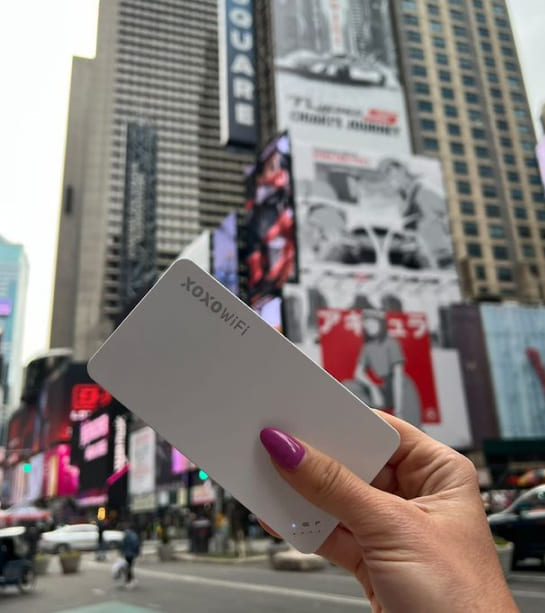
A XOXO WiFi router is a compact portable hotspot that creates a private wireless internet connection wherever you travel. The device connects to local mobile networks and allows multiple devices to access the internet simultaneously.
Unlike traditional SIM card solutions, there is no need to change settings on your smartphone or purchase a local SIM card after arrival. Simply switch on the router and connect your devices.
How to use a XOXO WiFi router?
Using the router is quick and simple:
- Reserve your XOXO WiFi router before departure.
- Receive the device before your trip or collect it according to your booking instructions.
- Turn on the router upon arrival in Fuerteventura.
- Connect your smartphone, tablet, laptop, or other devices to the WiFi network.
The entire setup takes only a few minutes and requires no technical knowledge.
Once activated, the router automatically connects to local mobile networks, providing internet access from the very beginning of your trip.
What can you do with a XOXO WiFi router in Fuerteventura?
With portable WiFi, you can:
- use maps and GPS navigation,
- search for beaches, restaurants, and attractions,
- book excursions and activities online,
- order transportation and taxis,
- share photos and videos instantly,
- work remotely from anywhere on the island,
- stay connected with family and friends,
- connect multiple devices at the same time.
Benefits of renting a XOXO WiFi router in Fuerteventura
Traveling with a portable WiFi router offers convenience, flexibility, and security.
Why choose XOXO WiFi?
✔ fast and reliable internet across Fuerteventura
✔ unlimited or high-capacity data options available
✔ connect multiple devices simultaneously
✔ no need to buy local SIM cards
✔ secure private connection compared to public Wi-Fi
✔ ideal for families, groups, and business travelers
✔ internet access immediately upon arrival
This is especially useful when exploring remote beaches, natural parks, and less populated areas of the island where finding reliable public Wi-Fi can be difficult.
Which devices can connect to the XOXO WiFi router?
The XOXO WiFi router works with virtually any WiFi-enabled device.
Compatible devices include:
- smartphones,
- tablets,
- laptops,
- smartwatches,
- cameras with WiFi functionality,
- gaming devices,
- other wireless equipment.
Several devices can stay connected simultaneously, making it a perfect solution for couples, families, and groups traveling together.
How to choose the best WiFi rental package for Fuerteventura?
The ideal package depends on the length of your stay and your internet usage.
For basic usage
If you mainly use:
- maps,
- messaging apps,
- social media,
a standard data package will typically be sufficient.
For heavy internet users
Consider a larger or unlimited package if you plan to:
- work remotely,
- stream movies and videos,
- upload large amounts of photos and videos,
- connect several devices simultaneously.
What should you pay attention to?
Before booking, check:
- data allowance or unlimited data availability,
- rental duration,
- coverage across the island,
- delivery and return options,
- overall price and value.
Does the XOXO WiFi router work immediately after arriving in Fuerteventura?
Yes — the router is ready to use as soon as it is switched on.
After arriving, simply:
- Turn on the device.
- Connect your devices to the WiFi network.
The router will automatically connect to a local mobile network.
This allows you to immediately:
- navigate from the airport to your accommodation,
- book transportation,
- find nearby restaurants and attractions,
- contact family and friends,
- access the internet from the first moments of your holiday.
XOXO WiFi Fuerteventura – convenient internet for your vacation
Renting a XOXO WiFi router is a modern and practical solution for travelers visiting Fuerteventura. It provides reliable internet access, flexibility, and eliminates the need to search for local SIM cards or depend on public Wi-Fi hotspots.
Whether you are relaxing on the beaches of Corralejo, exploring the volcanic landscapes of the island, surfing along the Atlantic coast, or discovering hidden gems across Fuerteventura — a XOXO WiFi router keeps you connected throughout your entire trip.





